The Permission Nobody Should Have Given Out
Somewhere around 2015, the web design industry made a quiet decision that it has never really reckoned with: it handed the keys to anyone with a mouse and an opinion about fonts.
Page builders like Elementor, Divi, and later Bricks were sold on a simple, seductive pitch. You don't need a developer. You don't need to understand code, servers, or how a browser actually renders a page. Just drag, drop, and publish. It was framed as democratization, the same way "no-code" and "low-code" tools are framed today. Anyone could build a website.
The problem is that "anyone could build a website" and "anyone should build a website" are two very different claims, and the industry has spent a decade quietly blurring the line between them. Web design isn't just picking colors and stacking sections. It's typography, hierarchy, performance budgeting, accessibility, and dozens of decisions that compound over years of a site's life. Giving that responsibility to someone with no training in any of it wasn't democratization. It was outsourcing risk onto business owners who had no way of knowing they were taking it on.
This article is about what that risk actually costs, in dollars, not just in principle.
How a Page Builder Actually Builds a Page
To understand the cost, you need to understand what's happening under the hood, because it's genuinely different from how a hand-coded WordPress theme works.
A well-built custom PHP theme outputs close to the minimum HTML, CSS, and JavaScript needed to render the page. A developer decides what loads, when it loads, and whether it needs to load at all.
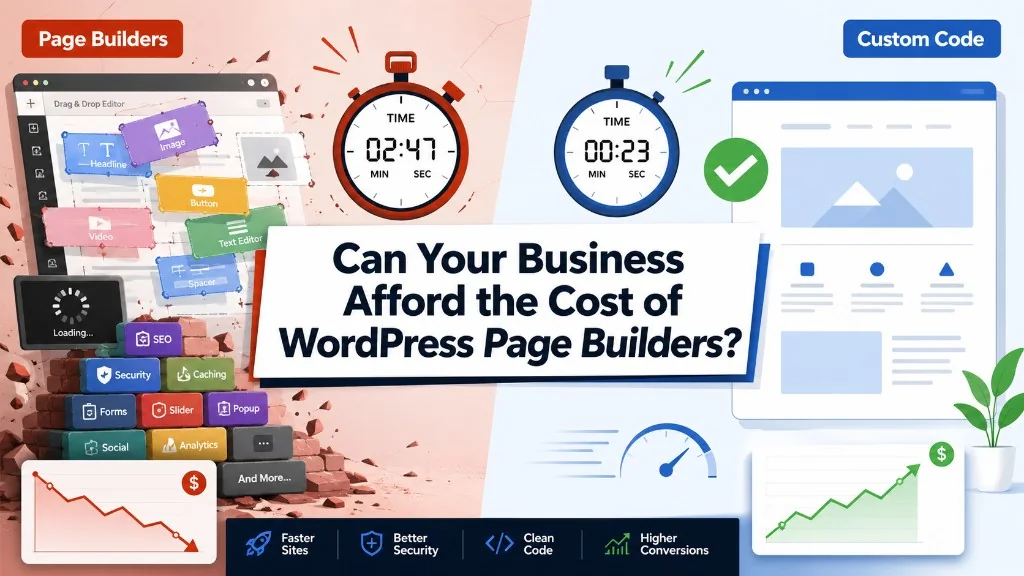
A page builder works differently. It has to solve a much harder problem: letting a non-technical person visually construct any layout, without knowing in advance what that layout will be. To do that, it wraps nearly everything in extra container divs, loads a general-purpose CSS framework instead of page-specific styles, and ships JavaScript for every possible widget, whether or not that widget appears on the page. Comparative testing across builders in 2026 found that Elementor typically adds somewhere in the range of 200 to 300 KB of CSS and JS even on genuinely lean templates, largely from that wrapper-div and generic-framework overhead. Bricks and Gutenberg, by contrast, tend to generate closer to plain semantic HTML, which is part of why independent scans have found Bricks-built sites scoring 20 to 40 percent better on Core Web Vitals than comparable Elementor builds (WebReveal).
Then plugins get stacked on top. Every plugin you install, for that slider, that popup form, that fancy testimonial carousel, adds its own CSS file, its own JavaScript file, and often its own database queries on every single page load, whether that plugin is actually being used on the page or not. Industry testing has shown that ten or more plugins can easily add 100+ additional HTTP requests to a page, and each of those requests can add 50 to 100 milliseconds on its own (Marketing Scoop). It doesn't take many plugins before those milliseconds become full seconds.
None of this is a rumor or an old wives' tale about WordPress. It's simply what a general-purpose visual tool has to do to remain general-purpose. The cost of flexibility is weight, and weight is time.
The Math Nobody Runs: What One Second Actually Costs
Here is the number that should make every business owner sit up: a one-second delay in page load time has been shown, across multiple independent studies including well-known research from Akamai and the Aberdeen Group, to cause roughly a 7 percent drop in conversions (Reform, TD Web Services). That's not 7 percent of your traffic leaving. It's 7 percent of the people who would have bought, booked, or called, simply not doing it, because the page made them wait one extra second.
Run the math on your own numbers and it gets uncomfortable fast. Take a business generating $10,000 a day in online revenue. A one-second delay costs roughly $700 a day in lost conversions. Over a year, that's over $250,000 left on the table, not because the offer was wrong or the traffic was bad, but because the page was slow (TD Web Services). And that's for one second. Data from Portent's analysis of 100 million page views found conversion rates falling from 3.05 percent at one second, to 1.68 percent at two seconds, to just 0.6 percent at five seconds (Reform). Most page-builder sites loaded with plugins and unoptimized images are living well past that five-second mark without anyone noticing, because nobody's watching the stopwatch.
This is the number that should be in every page builder's pricing conversation and never is.
It's Not Just Conversions: The Other Ways Speed Bills You
The conversion hit is the headline number, but it's far from the only cost.
Mobile abandonment. Over half of mobile visitors, 53 percent, will abandon a page outright if it takes longer than three seconds to load (Aberdeen Group data via Reform). That's traffic you already paid for, through ads or SEO, walking away before your message even renders.
Search ranking. Google has built page speed directly into its ranking algorithm through Core Web Vitals. A slow site doesn't just convert worse, it also shows up lower in search results, which means fewer people ever see the slow page in the first place. This is a compounding cost: less visibility leading to less traffic leading to less revenue, on top of the conversion loss already happening to the traffic that does arrive.
Brand perception. A slow site doesn't read as "we're a growing company that hasn't optimized yet" to a visitor. It reads as unprofessional, outdated, or untrustworthy, and that perception attaches to the business, not the tool that built the website.
Lock-in and migration cost. Page builders store content in proprietary formats. Divi's shortcode architecture and Elementor's widget-based storage don't transfer to another platform without a manual rebuild. Businesses that outgrow their builder, or simply want to leave, often discover the real bill isn't the monthly license. It's the cost of rebuilding years of content from scratch because there's no clean export path (WPPoland).
Accumulated technical debt. Templates built without reusable structure mean that adding one new field can mean manually editing dozens or hundreds of individual pages, because the page builder never had reference-based templating in the first place. Agencies have built entire maintenance retainers around cleaning up exactly this kind of drift.
The Builder-by-Builder Reality Check
Not all page builders carry the same weight, and it's worth being specific rather than lumping them together.
| Builder | Typical performance profile | What drives the cost |
|---|---|---|
| Elementor | Heaviest by default | Adds roughly 200 to 300 KB of CSS/JS even on lean pages, plus a wrapper div for nearly every widget. Most bloat in the wild comes from stacked third-party add-ons, not the core plugin itself. |
| Divi | Heavier, improving | Historically shortcode-based output, which is harder to optimize and harder to migrate away from. Divi 5's move to a block-based architecture has helped, but it still trails Bricks and Beaver Builder on raw performance. |
| Bricks | Leanest of the visual builders | Generates semantic HTML and native CSS grid, and can approach custom-theme performance when built by someone who understands the underlying code. The trade-off is a real CSS/flexbox learning curve. |
| Gutenberg (native blocks) | Lightest overall | Built into WordPress core with no extra plugin layer, rendering close to plain HTML. The limitation is design flexibility, not speed. |
| Custom PHP theme | Ceiling for performance | A developer controls exactly what loads and when, with nothing shipped that the page doesn't need. |
The pattern across nearly every serious 2026 benchmark is the same: performance scales inversely with how much visual flexibility you hand to someone with no code background (PluginTheme.net, WP Rocket).
Content Edits That Quietly Wreck Rankings
Losing a ranking rarely looks dramatic. It usually looks like someone made a small, reasonable-sounding edit, and a few weeks later the page that used to bring in leads just isn't showing up anymore. A few of the most common ways this happens:
Trimming "too much text." A page that's been ranking well for months often has more copy than it looks like it needs, because that copy is covering long-tail phrases and topical depth Google has come to associate with the page. Cutting it to look cleaner can cut the exact signal that earned the ranking.
Renaming a page. Most builders auto-generate the URL from the page title. Change the title, and the URL can quietly change with it, breaking every backlink and internal link pointing to the old address unless a redirect gets set up.
Replacing an image. A "better" photo dropped in to replace an old one usually arrives without the alt text or descriptive filename the original had, along with any image-search traffic that was attached to it.
Duplicating a page to save time. Copying an existing page as a shortcut for a new one is a common builder habit. Without a new canonical tag and rewritten content, it can create duplicate content that drags both pages down, or lets the wrong one win the ranking.
Editing something "global." Header, footer, and repeated widgets in Elementor and Divi apply sitewide. One edit meant for a single page can change contact info, break navigation, or strip schema markup across the entire site without anyone noticing until traffic drops.
The Self-Editing Trap
This is where the "giving people permission" problem becomes very personal, and very expensive.
A page builder's whole pitch is that the business owner can log in and make changes themselves. In practice, this is where a lot of the damage actually happens. A well-meaning owner adds a new section, drags a widget into the wrong container, or installs "just one more" plugin to get a feature they saw on a competitor's site. Nothing crashes visibly. The site still loads. But the DOM just got heavier, another script just got queued, and the load time crept up by a few hundred milliseconds nobody measured.
Multiply that by every edit, every plugin, every "quick fix" over a year, and you get a site that has quietly decayed in performance without a single dramatic failure to point to. The owner isn't a bad editor. They were simply never given the tools to see the cost of what they were doing, because the builder's entire value proposition depends on making that cost invisible.
This is the real price of "anyone can build a website." It's not that anyone can't. It's that almost nobody can see the meter running while they do it.
To Be Fair: Where Page Builders Actually Earn Their Keep
None of this means page builders are a mistake in every case, and it would be dishonest to pretend otherwise.
For a solo business owner who needs a site up this month and has no budget for ongoing development, a page builder with a strict template and a good hosting setup is a legitimate answer. For agencies managing dozens of client sites with non-technical marketing teams who need to edit their own pages day to day, visual editing isn't a luxury, it's a requirement. For fast landing pages tied to a single campaign that will be retired in three months, the performance ceiling of a page builder rarely matters enough to justify custom development.
Even the performance argument isn't absolute. Bricks and Beaver Builder, used carefully by someone who understands the underlying CSS, can get remarkably close to hand-coded performance. The honest failure mode isn't the tool. It's using a general-purpose visual builder, stacking plugins on top of it without oversight, and handing ongoing edits to someone with no way of knowing what any given change costs.
The Real Question to Ask Before You Build
The question was never "can a page builder make my site look good." Most of them can. The question is whether your business can absorb the compounding cost of every extra second that decision quietly adds, in conversions, in search visibility, in brand trust, and in the years of technical debt that come from letting a general-purpose tool make site-specific decisions.
For some businesses, that trade is worth it. For a business depending on its website to convert traffic into revenue at scale, it rarely is. Before choosing a page builder, or before auditing the one already running your site, it's worth actually running the math above with your own numbers. The 7 percent isn't a scare tactic. It's a documented, repeatedly measured number, and it's very likely already showing up in your analytics, whether or not anyone has gone looking for it.
If your WordPress site is carrying page-builder weight, JK Dreaming can identify what is slowing it down and what it is costing you. Explore our WordPress development services, review our technical SEO audits, or book time to plan the next step.






![Web Design Cincinnati Ohio: How to Choose the Right Web Designer [2026 Guide] feature image](/_next/image/?url=%2Fblog%2Fweb-design-cincinnati-ohio-choosing-web-designer.webp&w=3840&q=75&dpl=dpl_3ZRw4DegyfyET1dWZyLhdRg9Wc3Z)